

KG Inicis Integration Guide in English, Step by Step
KG Inicis documents its payment flow only in Korean. Here it is in English: merchant contract, SHA-256 signature, server approval, 10-minute net cancel.
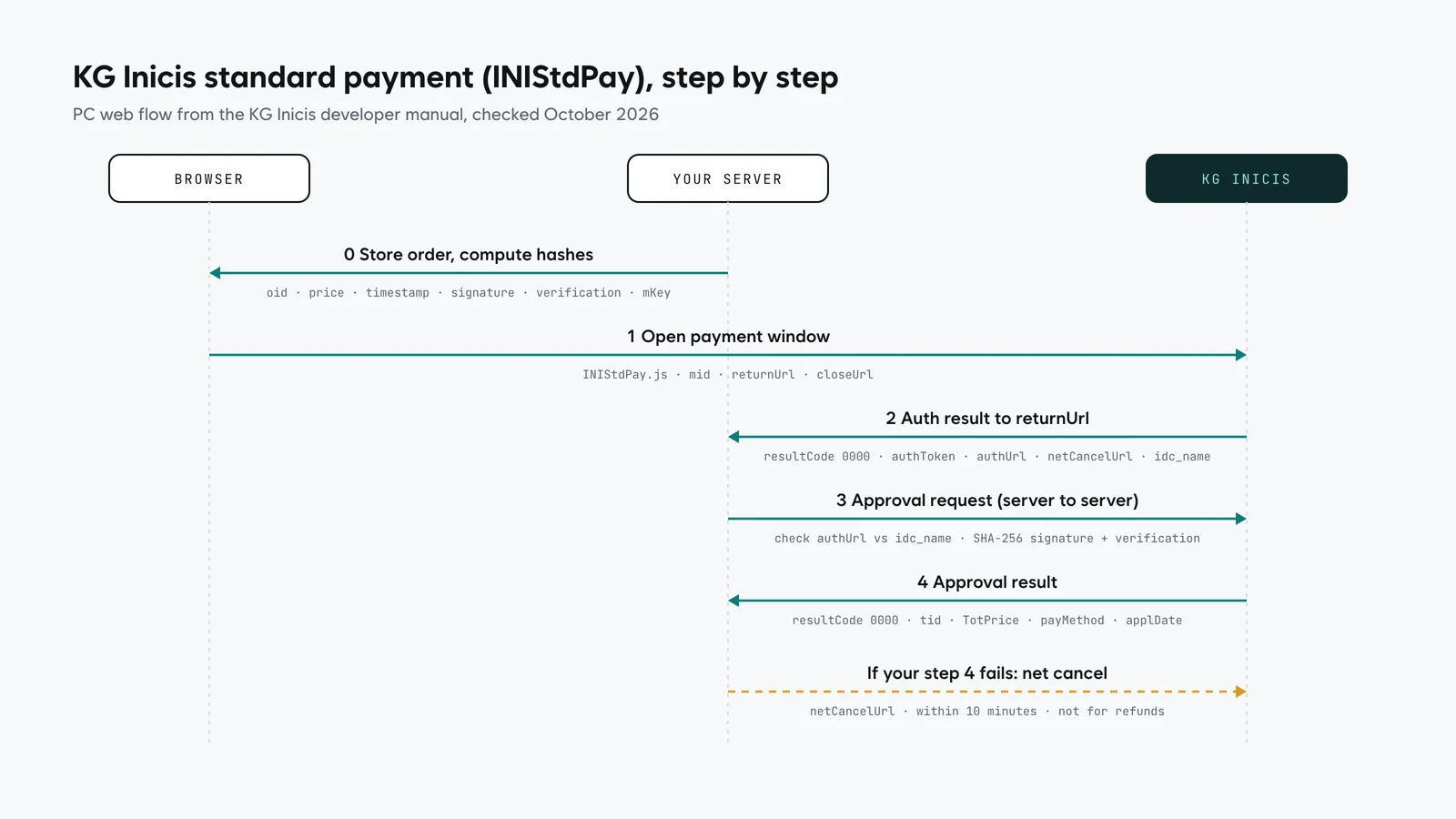
Integrating KG Inicis takes two tracks that run in parallel: a merchant contract, which needs a business registered in Korea, and a four-step payment flow on your site. In the standard web flow, your page opens the Inicis payment window with a SHA-256 signature, Inicis returns an authentication result to your return URL, your server sends the approval request to the URL Inicis gave it, and you cancel through the net-cancel URL if anything fails within 10 minutes. KG Inicis documents this only in Korean, so this guide explains it in English, step by step.
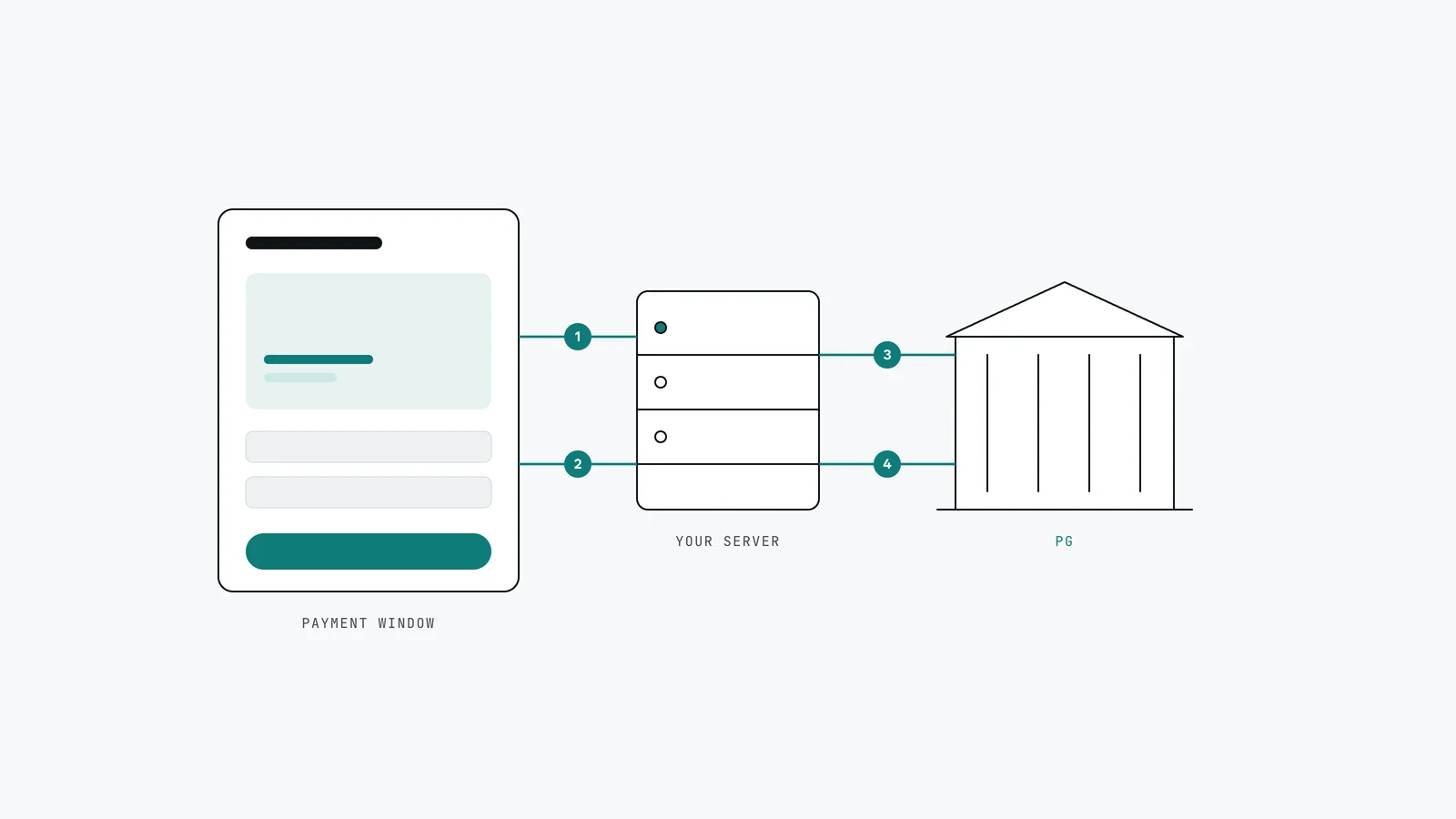
For how KG Inicis compares with NHN KCP, NicePay, Toss Payments and Eximbay, including published fees, see Korean payment gateways compared. This page is about the integration itself.
What do you need before you write any code?
| Item | Where it comes from | Notes |
|---|---|---|
| A business registered in Korea | Your Korean entity or branch | The Inicis application asks for a Korean business registration number |
| Merchant contract | KG Inicis application and document review | Corporate documents for the Korean company; payment methods are set in the contract |
| MID (merchant ID) | Issued with the contract | Ask your Inicis contact which payment methods are active on it |
| Sign Key for web payments | Inicis merchant admin: store information, contract information, key information | Kept on your server, never in the browser |
| Staging access | stgstdpay.inicis.com, port 443 | Allow it through your firewall for testing |
| Return and close URLs | Your site | The return URL must be on the same domain as the page that requests the payment |
If your company has no Korean entity, KG Inicis is not the starting point. Look at Stripe's Korean payment methods or Eximbay first; our Stripe in Korea guide explains the condition that decides it.
How does the KG Inicis standard payment flow work?
The PC web flow (INIStdPay) has four steps. The mobile web flow is documented separately in the Inicis manual and follows the same pattern of authentication, then server-side approval.
Step 1. Request the payment. Your checkout page loads INIStdPay.js from stdpay.inicis.com and posts a form with, among others, version (fixed at "1.0"), mid, a unique order number oid, the amount price, a millisecond timestamp, use_chkfake set to "Y", the goods and buyer fields, returnUrl and closeUrl. Three hashes protect the request:
| Field | SHA-256 of |
|---|---|
signature | oid, price, timestamp |
verification | oid, price, signKey, timestamp |
mKey | the signKey for your mid |
Step 2. Receive the authentication result. After the customer authenticates in the payment window, Inicis posts the result to your returnUrl. A resultCode of "0000" means success. You also receive authToken, authUrl (where to send the approval), netCancelUrl and idc_name. Check that authUrl matches the idc_name value and sits on an inicis.com domain before you call it.
Step 3. Send the approval request from your server. Your server posts mid, authToken, timestamp, a signature (SHA-256 of authToken and timestamp) and a verification (SHA-256 of authToken, signKey and timestamp) to the authUrl, choosing JSON, XML or NVP as the response format.
Step 4. Record the result. A resultCode of "0000" is an approved payment. Store the transaction ID tid, the order number, the total amount, the payment method and the approval date and time with the order.
If step 4 fails on your side, for example your database write throws, call the netCancelUrl from step 2. Inicis accepts a net cancel only within 10 minutes of the authentication result, and it is for this exception only, not for normal refunds, which go through the cancellation API.
Want this built rather than read? Write to us in two minutes: tell us your stack and whether you already have an Inicis contract. No brief needed.
Which mistakes come up most often?
- Trusting the browser. The amount and order number must be checked on your server against the order you stored before opening the payment window.
- Skipping the `authUrl` check. Validate it against
idc_nameand theinicis.comdomain before posting your keys to it. - Using net cancel as a refund. It exists for the 10 minutes after authentication when your own processing fails. Refunds use the cancellation API.
- A return URL on another domain. It must match the domain of the page that opened the payment window.
- Forgetting mobile. The mobile web flow is a separate integration, and Korean mobile payments often hand off to card company apps, including from in-app browsers such as KakaoTalk's. Test on real phones, not only a desktop browser.
- Leaving staging blocked. Allow
stgstdpay.inicis.comon port 443 if your servers restrict outbound traffic.
Can you use KG Inicis on Shopify, WooCommerce or a Korean shop builder?
KG Inicis provides ready-made connections for Korean hosted shop builders and for WordPress WooCommerce, and lists Shopify and Wix integrations. On Shopify and Wix, it states that only Korean-issued credit cards are available. For a custom site or web app, you integrate the flow above directly, or through an integration layer such as PortOne if you expect to add or switch gateways later. Our Korean payment integration guide compares those routes.
How long does a KG Inicis integration take?
The two tracks run in parallel, so start the contract in week one.
| Track | What happens | Who | Time |
|---|---|---|---|
| Contract | Application, document review, contract, MID and Sign Key | Your Korean company, with our help on the Korean side | On KG Inicis's schedule |
| Build | Order storage, payment window, approval, net cancel, result pages | Us | 3–5 development days for a one-time payment module |
| Recurring billing (if needed) | Billing key and scheduled charges | Us | 5–10 development days |
| Test | Staging, then a small live transaction and a cancellation | Us and you | Before launch |
What does it cost?
In our pricing catalogue (version 1.1), a one-time payment integration is USD 550–1,300 and recurring (subscription) payments USD 1,400–2,900, excluding 10% VAT. KG Inicis's own fees are charged by Inicis and passed through at cost; its published card rates in 2026 were 3.00% to 3.50%, excluding VAT.
How we integrate Korean payments
We build the checkout, the server-side approval and the refund flows, and test them on desktop and mobile before launch. On the Korean side, we prepare the payment gateway application and handle the Korean-language communication with the provider, while the merchant contract stays in your company's name. Our own client portal runs recurring card payments through a Korean payment service in production. Our English-speaking founder handles consultations and documents directly, and we bill in US dollars or by overseas transfer if you prefer.
See the Korean services we connect on Korea integrations.
Frequently asked questions
Does KG Inicis have English documentation?
The KG Inicis developer manual is in Korean. The flow is standard, though: a payment window, an authentication result on your return URL, a server-side approval request and a net cancel for failures. This guide sets out those steps in English.
Can a foreign company use KG Inicis?
Only through a business registered in Korea. The application asks for a Korean business registration number. A foreign national can be the representative of that Korean company. Without a Korean entity, start with Stripe's Korean payment methods or ask Eximbay.
What is the KG Inicis Sign Key?
It is the key tied to your merchant ID that is used to compute the verification and mKey hashes. You find it in the Inicis merchant admin under your contract's key information, and it stays on your server.
What is net cancel in KG Inicis?
Net cancel reverses a payment when your server fails to complete the approval step. It is available only within 10 minutes of the authentication result and is not used for normal refunds.
How much does it cost to integrate KG Inicis?
In our catalogue, a one-time payment integration is USD 550–1,300 and recurring payments USD 1,400–2,900, excluding VAT, with 3–5 and 5–10 development days respectively. Inicis's transaction fees are separate.
Sources
All checked in 2026.
- KG Inicis developer manual, PC standard payment (INIStdPay) (Korean)
- KG Inicis, payment methods and fees (Korean)
- KG Inicis, service application and hosting integrations (Korean)
- KG Inicis, contract documents (Korean)
- NQ Solution pricing catalogue v1.1, in USD excluding VAT
Need KG Inicis or another Korean PG wired in?
Write to us in two minutes with your stack and where you are with the contract: no brief needed. If you have the Inicis documents or your current checkout code, send them with the project request form. To outline the whole project first, use the estimator.